




Pressure Washing CRM + Live Dashboard (Digital Download)
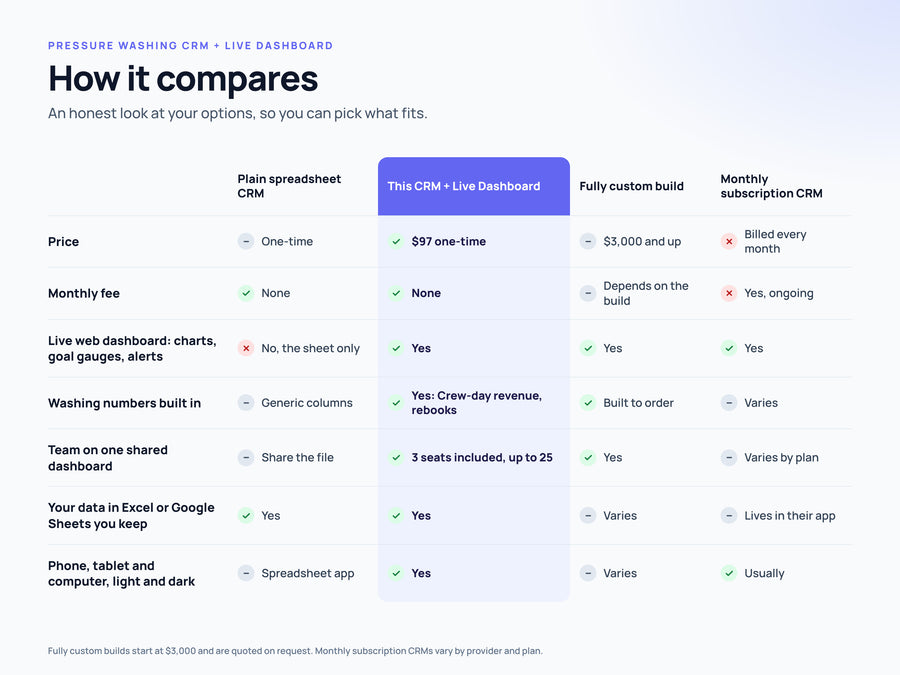
One-time price. No monthly subscription.
- Instant download: Excel + Google Sheets workbook
- Live dashboard for phone, tablet and computer
- 3 team seats included
- Secure checkout
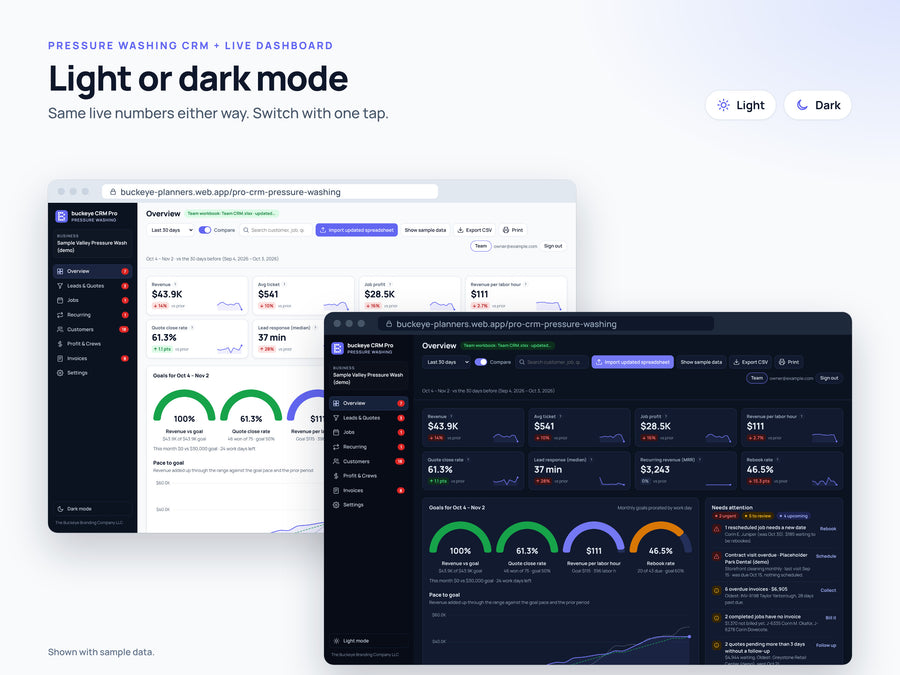
Not just a spreadsheet CRM. A live dashboard your whole team shares. Your CRM workbook comes with a live web dashboard: KPI tiles, goal gauges, charts and alerts that update with your numbers, built for your phone, with light and dark mode. Plus 3 team seats and the full Excel + Google Sheets workbook. One-time price, no monthly subscription.
Every lead, quote, job, crew and rebook in one place, with revenue per crew-day and the season's goals you can see at a glance.
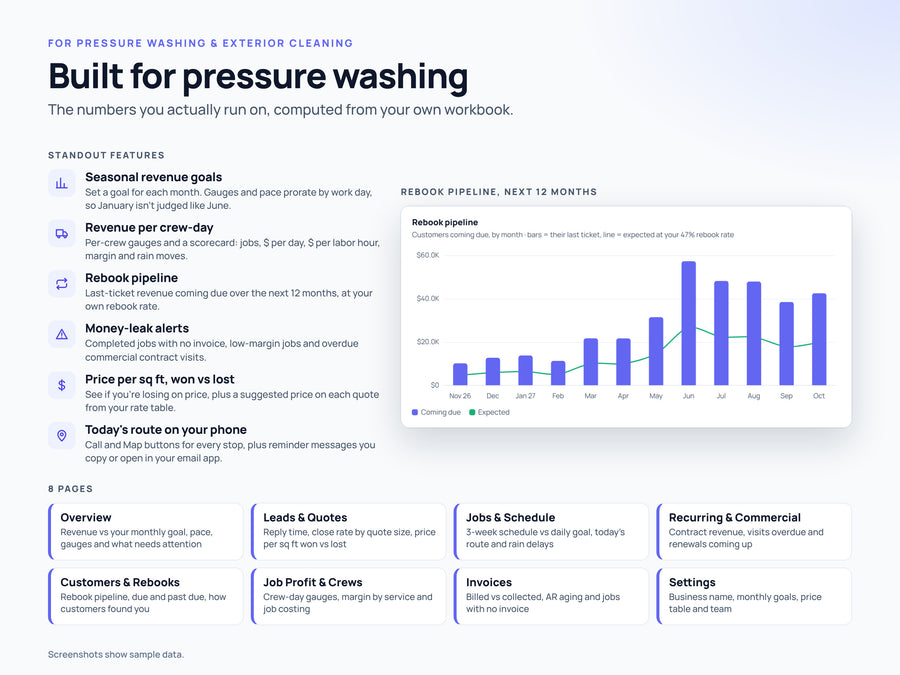
Made for pressure washing, soft washing and exterior cleaning companies. Answer leads fast, price jobs from your own rate table, run the day's route from your phone and keep last year's customers coming back. The live dashboard shows revenue against a goal you set for each month, revenue per crew-day, close rate, job margin, money owed and what needs attention today.
What's included
- Pressure Washing CRM + Live Dashboard - BLANK.xlsx (ready for your data)
- Pressure Washing CRM + Live Dashboard - SAMPLE.xlsx (filled with example data to explore)
- Access card (PDF) with setup steps and a QR code to your live dashboard
- Live online dashboard for phone, tablet or computer
- 3 team seats: you plus 2 teammates
What it does
- Leads and quotes with reply time, close rate by quote size and price per sq ft won vs lost
- Suggested price on each quote from your Settings price table (price per sq ft and minimum charge)
- Jobs with crew, labor cost, job profit and margin %, plus a 3-week schedule against your daily goal
- Seasonal revenue goals: set a goal for each month and every gauge prorates by work day
- Revenue per crew-day with per-crew gauges and a crew scorecard ($/day, $/labor hour, margin, rain moves)
- Rebook pipeline: last-ticket revenue coming due over the next 12 months at your own rebook rate
- Commercial contracts with next visit due, overdue visits and renewals
- Alerts for completed jobs with no invoice, low-margin jobs and leads waiting for a reply
- Today's route with Call and Map buttons, plus rebook, quote follow-up and renewal messages to copy or open in your own email app (nothing is sent automatically)
The live dashboard
Your workbook's numbers as a live web dashboard: KPI tiles, goal gauges, charts and a needs-attention list across Overview, Leads & Quotes, Jobs & Schedule, Recurring & Commercial, Customers & Rebooks, Job Profit & Crews, Invoices and Settings. Pick a date range, compare to the prior period, search, export to CSV or print. It works on phone, tablet and computer, in light or dark mode. Load your workbook and every page redraws with your data. If something in the workbook needs fixing, like a won quote with no decision date, the dashboard tells you.
Team seats
Your order includes 3 team seats: you (the account owner) plus 2 teammates. Add teammates by email from the Team panel; they sign in with that email and see the same dashboard. Whoever loads an updated workbook updates it for everyone, and the dashboard shows who updated it and when ("updated by ... 5 min ago"). If two people update at once, the second person is asked before replacing. Need more? Extra Team Seats add 5 at a time, up to 25 in total.
How it works
- Download your files right after checkout. Open the BLANK workbook in Excel, or upload it to Google Drive and open it with Google Sheets. The Start Here tab walks you through setup. Enter your business name and goals on the Settings tab.
- Go to buckeye-planners.web.app/pro-crm-pressure-washing and sign in with an email link or Google, using the email you bought with. Your dashboard unlocks automatically. If it ever asks, enter your order number on the unlock screen.
- Tap Load your workbook and pick your .xlsx file. The dashboard saves it to your team account, so it's there on any device.
- Tap Team to add teammates by email. They sign in with that email and see the same dashboard.
Good to know
- Room for 2,000 rows per tab.
- Works in Microsoft Excel (Mac or Windows) and Google Sheets. No macros, no add-ins.
- Using Google Sheets? Download it as .xlsx (File > Download > Microsoft Excel) before loading it into the dashboard.
- One-time price, no monthly subscription.
- Want it set up for you? The Done-For-You Setup imports your customer list, sets your stages, team and goals, and includes 10 team seats.
- Need custom fields or something built from scratch? Ask about a fully custom CRM (from $3,500).
- Digital download only. No physical item is shipped.
- Sample names and numbers are made up.
- Figures are estimates from your own data, not financial, legal or tax advice.
Questions? Email sales@buckeyebrandingcompany.com. Made by The Buckeye Branding Company, a family business in Copley, Ohio.